



Introduction to “Package Acceptance Pending”
In today’s fast-paced digital world, online shopping and shipping have become part of everyday life. Whether you are ordering clothes, electronics, school supplies, or sending an important gift, tracking your shipment provides peace of mind. But sometimes, instead of seeing “In Transit” or “Out for Delivery,” you see a confusing message: Package Acceptance Pending.
This status can create stress, confusion, and even frustration. You may start wondering:
- Is my package lost?
- Did the courier receive it?
- Is there a problem with my shipment?
- Will it be delayed?
If you have ever seen this tracking update, don’t worry. This complete guide will explain everything you need to know about Package Acceptance Pending, why it happens, how long it lasts, and what steps you can take to resolve it quickly.
What Does “Package Acceptance Pending” Mean?
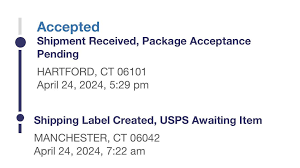
The tracking status Package Acceptance Pending means that a shipping label has been created, but the package has not yet been officially scanned into the carrier’s system.
In simple words:
👉 The shipping process has started digitally.
👉 But the physical package has not been scanned or officially accepted by the carrier yet.
This status usually appears with major shipping companies such as:
- United States Postal Service (USPS)
- FedEx
- UPS
- DHL
It is important to understand that this does not automatically mean your package is lost. In most cases, it simply means the system hasn’t updated yet.
How the Shipping Process Works
To better understand “Package Acceptance Pending,” let’s break down how shipping typically works:
1. Label Creation
The sender creates a shipping label online. At this stage:
- Tracking number is generated.
- The carrier’s system recognizes the shipment.
- Status may show “Shipping Label Created” or “Pre-Shipment.”
2. Package Drop-Off or Pickup
The sender:
- Drops the package at a post office or drop box.
- Schedules a pickup.
- Hands it directly to a courier employee.
3. Acceptance Scan
This is the key step. The carrier scans the package into their system. Once scanned:
- The status changes to “Accepted.”
- The package officially enters the shipping network.
If step 3 hasn’t happened yet — you may see Package Acceptance Pending.
Common Reasons for “Package Acceptance Pending”
There are several reasons why this status appears. Let’s explore them in detail.
1. The Package Was Dropped Off but Not Scanned Yet
This is the most common reason. During busy periods, employees may collect many packages but scan them later at a processing facility instead of immediately at the counter.
2. High Shipping Volume
During peak seasons such as:
- Holidays
- Black Friday
- Back-to-school season
Shipping centers handle thousands of packages daily. Backlogs can delay scanning.
3. Scheduled Pickup Delay
If a pickup was scheduled:
- The driver may not have scanned it on the spot.
- It may only be scanned at the distribution center.
4. Drop Box Delays
When packages are placed in drop boxes:
- They are collected at specific times.
- Scanning may happen hours later.
5. Technical System Delays
Sometimes, the package is scanned — but the tracking system hasn’t updated yet due to:
- Server delays
- System syncing issues
- Temporary website glitches
6. Incorrect Drop-Off Location
If the package was dropped at the wrong facility or third-party location, scanning might be delayed.
How Long Does “Package Acceptance Pending” Last?
Normally, this status lasts:
- 24 to 48 hours in standard conditions.
- Up to 72 hours during busy periods.
- Longer during holidays or extreme weather events.
In rare cases, it may last several days if the package was misplaced before scanning.
What To Do If Your Package Says “Package Acceptance Pending”
Now comes the important part — what action should you take?
1. Wait 24–48 Hours
In most cases, the issue resolves itself within two days.
2. Confirm the Sender Dropped It Off
If you are the buyer:
- Contact the seller.
- Ask for confirmation of physical drop-off.
- Request a receipt if possible.
3. Check Drop-Off Time
If the package was dropped late in the evening:
- It may not be scanned until the next business day.
4. Contact the Carrier
If there is no update after 48–72 hours, contact the shipping company directly:
- United States Postal Service Customer Service
- FedEx Support
- UPS Help Center
- DHL Service Desk
Provide:
- Tracking number
- Shipping date
- Sender details
5. Visit the Local Post Office
If you dropped it off personally, visiting the location may help clarify the situation.
Is Your Package Lost?
Seeing “Package Acceptance Pending” does not automatically mean your package is lost.
Most of the time:
- The package is physically moving.
- It just hasn’t received its first scan.
However, if:
- 5–7 business days pass
- No tracking updates appear
- The sender has no receipt
Then you may need to start a missing mail search or claim.
Difference Between “Package Acceptance Pending” and “In Transit”
Many people confuse these two statuses.
Package Acceptance Pending
- Label created
- Not officially scanned
- Not confirmed in shipping network
In Transit
- Scanned and accepted
- Moving between facilities
- On the way to destination
The key difference is that “In Transit” confirms the carrier has officially processed the package.
How Businesses Can Avoid “Package Acceptance Pending” Issues
If you are a seller or small business owner, you can reduce this issue by:
1. Getting a Receipt at Drop-Off
Always request a physical scan confirmation.
2. Avoiding Drop Boxes for Important Shipments
Hand packages directly to staff members.
3. Scheduling Confirmed Pickups
Ask the driver to scan packages during pickup.
4. Shipping Early
Avoid last-minute shipping during peak seasons.
How Technology Impacts Package Scanning
Modern logistics relies heavily on:
- Barcode scanning
- Automated sorting machines
- Real-time tracking software
- Cloud data systems
If one part of this digital chain slows down, tracking updates may lag — even if the package is physically moving.
When Should You Be Concerned?
You should take action if:
- The status remains unchanged for more than 5 business days.
- The sender cannot confirm drop-off.
- The package was time-sensitive (legal documents, medicine, etc.).
In such cases:
- File a service request.
- Keep documentation.
- Request insurance claims if applicable.
Does Insurance Cover “Package Acceptance Pending”?
Insurance usually covers:
- Lost packages
- Damaged goods
But if the package was never officially scanned, proving acceptance may be difficult. That’s why scan receipts are important.
ps to Prevent Stress While Waiting
Waiting for a package can be frustrating. Here are some calming reminders:
- Most delays are temporary.
- Scanning often happens in bulk.
- Tracking systems are not always instant.
- The majority of packages arrive safely.
Patience combined with smart follow-up is the best approach.
Frequently Asked Questions About Package Acceptance Pending
Q1: Can a package still arrive without ever updating?
Yes, in rare cases, tracking jumps directly to “Out for Delivery.”
Q2: Is this status normal?
Yes, especially within the first 24 hours.
Q3: Should I request a refund immediately?
No, wait at least 48–72 hours first.
Q4: Does this mean the seller didn’t ship it?
Not necessarily. It may simply not be scanned yet.
Final Thoughts on Package Acceptance Pending
The phrase Package Acceptance Pending may sound serious, but in most cases, it is simply a temporary tracking delay.
Understanding the shipping process helps remove fear and confusion. Instead of assuming the worst, take these steps:
- Stay patient for 24–48 hours.
- Confirm drop-off details.
- Contact the carrier if needed.
- Keep records for safety.
In today’s world of instant updates, even a small delay can feel alarming. But remember — logistics systems process millions of packages daily. A brief pause in tracking does not usually mean disaster.
Stay informed, stay patient, and your package will most likely be on its way soon.
READ MORE: NEWZTOP.CO.UK
